


Updated for travelers, expats, and first-time visitors who want a smoother Korea trip without getting lost.
If you have ever landed in Seoul, opened Google Maps with full confidence, and then felt your travel plan slowly fall apart, you are definitely not alone.
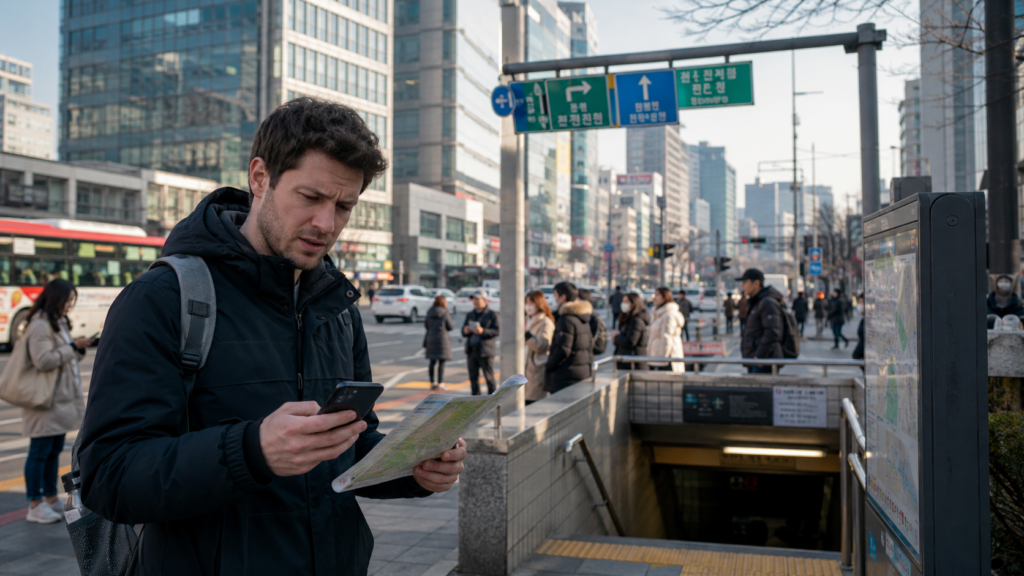
I had that exact moment on my first long stay in Korea. I remember standing outside an exit in Gangnam, looking at my phone, thinking, “This should be easy.” It was not. The map looked familiar, but the directions felt incomplete, the walking route was shaky, and searching for small local places was hit-or-miss. Meanwhile, my Korean friends were moving around effortlessly with apps I had barely touched before.
That was the moment I stopped asking, “Why is Google Maps broken?” and started asking a better question: “What actually works in Korea?”
This guide is for that exact moment. I will explain why Google Maps has felt limited in South Korea, why local apps usually perform better, and how to build a simple setup using Naver Map, KakaoMap, and Papago so you can navigate like a normal person instead of a stressed tourist with 3% battery.
💡 1) Why Google Maps Does Not Work Well in Korea: 5 Core Reasons
1. Google Maps has historically had limited access to Korea’s most detailed map data
This is the biggest reason. In many countries, Google Maps works as the default because it has deep mapping data, rich routing layers, and years of local optimization. In Korea, that experience has been weaker for a long time because high-precision mapping data has been restricted. In plain English, Google could not always operate with the same depth there as it does in the U.S., Japan, or much of Europe.
So even when the app opens normally, the experience on the street can feel thinner than what people expect.
2. Korea is a hyper-local search environment
Korea moves fast, and local businesses change fast too. Tiny cafés, basement restaurants, side-street clinics, beauty shops, and pop-up stores often live inside a very local digital ecosystem. That means the best listing data, reviews, nicknames, building names, and navigation hints often show up first in Korean platforms.
I noticed this the hard way with restaurants. A place could be famous on Korean apps and still feel oddly invisible or incomplete on Google Maps. Once I switched to local tools, the same neighborhood suddenly made sense.
3. Address formats can be confusing for non-Korean users
Korea uses road-name addresses, older land-lot style addresses, building names, subway exits, and local shorthand. If you only search in English, you may miss what locals are actually using. A destination can technically exist on Google Maps, but if the search behavior is not tuned to the way people in Korea really refer to places, your results can feel unreliable.
> My personal rule in Korea: if a place is hard to find in English, I copy the Korean name into the map app before assuming the place is closed. That one habit saved me more times than I can count.
In Korea, “good enough” mapping is usually not good enough. You need accurate subway exits, bus transfers, walking segments, building entrances, and timing. The difference between Exit 4 and Exit 8 can be ten extra minutes and one steep hill. Local apps tend to be better at this final stretch, which is exactly where travel stress usually peaks.
5. Google Maps may improve, but local habits do not change overnight
Even as the policy environment shifts, local behavior matters. Koreans have spent years relying on Naver Map and KakaoMap. Reviews, shared locations, business updates, and daily routines already live there. So from a practical user point of view, the best app is not just the one with a map. It is the one people around you are already using.
If I had to recommend just one map app for most foreign visitors in Korea, it would be Naver Map. It is strong for searching restaurants, cafés, landmarks, transit, and neighborhood-level spots that feel deeply local. It also tends to be more useful when you are trying to understand what is actually around you right now, not just what is famous online.
Naver Map feels especially strong when you are in dense areas like Hongdae, Seongsu, Euljiro, or Busan neighborhoods where businesses are packed into one building or tucked into smaller side streets.
KakaoMap: best for clean interface and local everyday usability
KakaoMap is also excellent. Some people prefer it because it feels clean, fast, and very natural for daily movement. I know travelers who like Naver Map for searching and KakaoMap for quick route confirmation. That sounds excessive, but in Korea it actually makes sense. Different apps can be good at different moments.
When I was rushing to meet someone near Jamsil, KakaoMap often felt slightly more comfortable for checking a route fast without overthinking it.
Papago: the bridge that makes the other two apps easier
Papago is not a map app, but it solves one of the biggest map problems in Korea: language friction. If a restaurant name, clinic, bus stop, or address appears in Korean, Papago helps you translate, copy, and understand what you are looking at. That makes both Naver Map and KakaoMap much more powerful.
In real life, the workflow is simple. You see Korean text. You translate it with Papago. Then you paste the Korean phrase back into your map app. That small loop dramatically improves search accuracy.
> One of my favorite travel hacks in Korea is screenshotting a place name from Instagram or a blog, translating it in Papago, and then searching the Korean text in Naver Map. It works far better than guessing the English spelling.
Need official travel help before you map your route?
Check Official Korea Travel Information
So which one should you install first?
My honest recommendation is simple:
- Naver Map for main navigation and local place search
- KakaoMap as a backup and second opinion
- Papago to remove the language barrier that causes most navigation mistakes

Google is still useful for inspiration. I still use it for checking popular spots, reading international reviews, and getting general context before a trip. But once I am physically in Korea, I switch to local apps for actual movement.
That mental separation helped me a lot. Google for research. Local apps for execution.
Step 2. Save both the English and Korean name of your destination
Before leaving your hotel or Airbnb, save the destination in two forms: the English name and the Korean name. If the English search fails, the Korean version often works instantly.
Step 3. Screenshot addresses before you go underground
Subways are efficient, but signal dips and rush-hour stress are real. Screenshot the destination name, nearest exit, and final walking route before you enter the station. This sounds basic, but it is one of those habits that makes you feel much calmer.
> I started doing this after one messy transfer in Seoul where I had the right station, the wrong exit, and absolutely no idea why the building I wanted was “right there” but somehow not visible. Screenshots fixed that problem fast.
Sometimes the issue is not the route. It is confirming that you arrived at the correct place. Papago helps with signs, store names, elevator directories, and handwritten notes posted outside businesses. That is especially useful in older buildings and food streets where many storefronts are stacked vertically.
Step 5. Keep one backup app ready
Do not depend on a single app in a country you do not know well. Even if you love Naver Map, keep KakaoMap installed. Or vice versa. Small redundancies reduce travel stress.
| Tool | Best For | Strengths | Weak Points | Best Use Case |
|---|---|---|---|---|
| Google Maps | Trip planning, global familiarity | Easy interface, broad global coverage, familiar for most travelers | Can feel limited in Korea for local place depth and on-the-ground routing | Research before the trip |
| Naver Map | Primary Korea navigation | Strong local search, practical routing, useful for neighborhood-level details | Can feel less intuitive at first for non-Korean users | Daily navigation inside Korea |
| KakaoMap | Fast route checking and backup navigation | Clean user experience, strong local usage, dependable second option | Some visitors still need time to adapt to the interface | Backup map app or alternate route check |
| Papago | Translation support | Helps with Korean text, place names, signs, and address understanding | Not a navigation app by itself | Language bridge for map search and real-world travel |
For travelers, this is usually the winning combo: Google Maps for broad planning, Naver Map for navigation, KakaoMap for backup, and Papago whenever language gets in the way.
💰 5) The Real Payoff: Time, Stress, and Cost Benefits
When people think about map apps, they think convenience. In Korea, it is bigger than convenience. It affects your timing, taxi costs, missed reservations, and overall energy.
What you can realistically gain by switching to local tools
- Save 10 to 30 minutes a day by avoiding wrong exits, bad search results, and repeated re-routing.
- Reduce missed bookings by finding the correct building entrance or floor on the first try.
- Lower taxi mistakes because you can show drivers a clearer Korean destination.
- Cut language stress by using Papago to confirm exact names and signs.
- Travel with more confidence, which is hard to measure but very easy to feel.
On a 5-day Korea trip, even a modest improvement can be meaningful. If better app choices save you just 20 minutes per day, that is over 100 minutes back. That is enough time for one extra café stop, one museum, one relaxed meal, or simply one less bad mood.
I say this from experience: map stress has a weird way of draining a day. The route itself may only be wrong by a few blocks, but mentally it can make you feel behind for hours. Once I accepted that Korea rewards local tools, everything got lighter.
For official Korea travel basics and broader planning, it also helps to cross-check South Korea government policy and travel information when relevant, especially if you want authoritative local context beyond social media tips.
✅ Final Take
Google Maps is not useless in Korea. It is just not the smartest app to depend on as your only navigation tool.
If you want the smoothest real-world experience, use Naver Map as your main map, keep KakaoMap as a backup, and rely on Papago whenever Korean text becomes the hidden obstacle between you and your destination.
That setup feels far more realistic, far more mobile-friendly, and honestly far more human. It is the difference between fighting the country’s digital system and moving with it.
❓ FAQ
Is Google Maps completely unusable in Korea?
No. It is still useful for general browsing, reviews, and trip planning. But for detailed local navigation, many people find Korean apps more reliable in daily use.
Which app should tourists install first in Korea?
If you only install one local map app, start with Naver Map. Then add KakaoMap as a backup and Papago for translation support.
Not perfectly, but even basic support helps. That is exactly why Papago is so useful. You do not need fluency. You just need a fast way to translate names, signs, and addresses.
Not universally. Some users prefer KakaoMap’s interface, while others prefer Naver Map’s search depth. In practice, many people do well by keeping both.
Will Google Maps get better in Korea over time?
Possibly, yes. But even if it improves, local apps already have deep user habits, local data, and everyday momentum. So for now, local tools still make the most practical sense for many users.